SkimAudio Software
Free Audio Archiver and AirCheck System
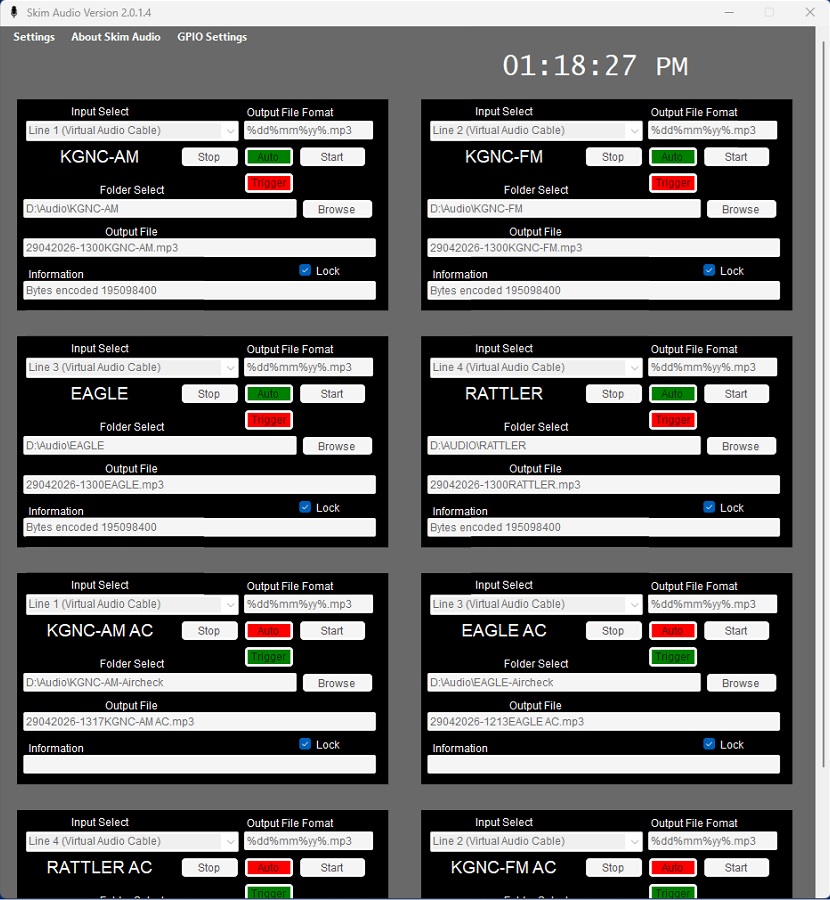
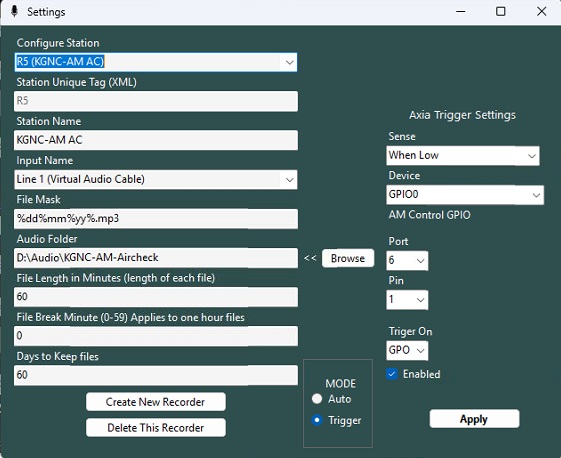
Configure Station: Select from the available recorders to configure.
Station Unique Tag: This is the ID number used for the XML configuration file tag.
Station Name: Enter a friendly name for the station.
File Mask: Leave as is. Currently not used in this version as the mask and files names are generated automatically.
Audio Folder: Select the audio folder to use for this recorder. You will usually want to set a directory for the exclusive use of this recorder.
File Length in Minutes: Enter the number of minutes contained in each file when recorder is in AUTO mode. It is highly recommended to use 60 minutes here.
File Break Minutes (0-59): This is the minute that the file stops recording and starts recording a new file. Normally set to zero, but can be shifted to any desired minute.
Days to Keep files: Number of days to keep files. All older files will be deleted. This can be different for each recorder.
Contact Singletone Software at the address posted here. I will send a download link. Licensing is free. Email address, First and Last name are required for download.
Price without support: $FREE
For Information, send email to: support@singletone.com
Please view the privacy and cookies policy
or click Close to exit